How to take a full-page screenshot of a website
Every browser can capture a whole page, and so can a few lines of Puppeteer or Playwright. The trouble is what the capture misses: images that wait for a scroll, cookie bars stamped into the middle of the image, pages that scroll inside a box. These guides give you code we ran, what broke in our tests, and how to fix each problem.
The quick answer
For a one-off, open Chrome DevTools, press Ctrl+Shift+P (Cmd+Shift+P on a Mac) and run "Capture full size screenshot". In code, call page.screenshot with fullPage: true in Puppeteer or Playwright, after scrolling once so lazy images load. To take screenshots from an app, a cron job or an AI agent, send the URL to a screenshot API.
Guides
Full-page screenshots in Puppeteer
The script we ran, why 4 of 8 lazy images came out grey without it, and fixes for cookie bars, inner scroll areas and tall pages.
Read the guide →Playwright · Node and PythonFull-page screenshots in Playwright
Node and Python side by side, the style option that hides cookie bars for the shot only, and the fix for pages that scroll inside an element.
Read the guide →Claude Code · MCPA screenshot tool for Claude Code
One claude mcp add line, team setup with .mcp.json, prompts to try, and what the errors in claude mcp list mean.
Read the guide →Five ways to capture a whole page
Pick by where the screenshot is needed. A person grabbing one page needs a browser shortcut; a product that captures thousands of user-submitted URLs needs something that runs without you.
| Method | Good for | Setup | Watch out for |
|---|---|---|---|
| Chrome or Firefox | One page, by hand | None. Chrome: DevTools command menu, "Capture full size screenshot". Firefox: right-click, Take Screenshot, Save full page. | Cookie banners stay in the shot. Not repeatable. |
| Puppeteer (Node) | Scripts, CI jobs, pages behind a login | npm i puppeteer, which downloads a browser | Missed 4 of 8 lazy images in our test until we scrolled. clip can't be combined with fullPage. |
| Playwright (Node, Python, Java, .NET) | Tests and scripts in more languages | npm i playwright or pip install playwright, then playwright install chromium | Missed images loaded by IntersectionObserver until we scrolled. PNG and JPEG only, no WebP. |
| Screenshot API | Apps, cron jobs, URLs your users submit | An API key and one HTTP request | Public pages only. Shotkiln scrolls the page before a full-page capture so lazy images load; check that your API does the same. |
| AI agent over MCP | Claude Code, Cursor and other agents | One claude mcp add line or a JSON entry | The agent sees the image, not the page text. Remote servers can't reach localhost. |
What we measured
We built test pages for the problems people report most, captured each at 1280 × 800 with full-page mode on, then again with the fixes from the guides. Puppeteer 25.14.0 and Playwright 1.64.1, headless, default launch options.
| Test page | Puppeteer, no fixes | Playwright, no fixes | With the fix |
|---|---|---|---|
8 images with loading="lazy" | 4 of 8 loaded, the rest grey | 8 of 8 loaded | 8 of 8 in both, after scrolling in steps |
| 8 images loaded by IntersectionObserver | 0 of 8 | 0 of 8 | 8 of 8 in both |
| Cookie bar fixed to the bottom | Painted once at the bottom of the first screen, mid-image | Same | Hidden for the capture |
Content that scrolls inside <main> | 1280 × 800, rows cut off | 1280 × 800, rows cut off | 1280 × 5640, all 40 rows |
| Page 30,000 px tall | One PNG, correct to the bottom | One PNG, correct to the bottom | No fix needed |
| Hero at 100vh | Stays 800 px tall | Stays 800 px tall | Don't resize the viewport to the page height: in Puppeteer the hero grew from 800 to 3,770 px |
Then a real page, the Wikipedia article on screenshots: all three scripts from the guides produced a 1280 × 4487 image with every image loaded.
One request, whole page
The same Wikipedia article through the Shotkiln API, no browser on your side.
curl "https://shotkiln.com/v1/screenshot?url=https://en.wikipedia.org/wiki/Screenshot&full_page=true&format=webp" \
  -H "x-api-key: $SHOTKILN_KEY" -o screenshot-full.webp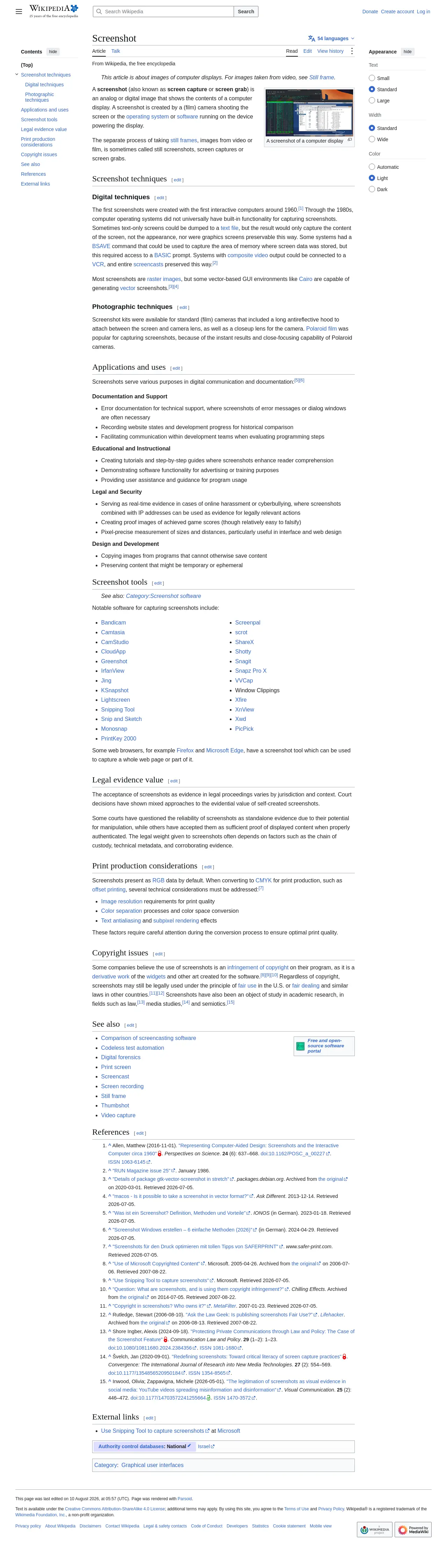
Before a full-page capture, Shotkiln scrolls down the page one screen at a time, waits for the network to settle and scrolls back up. It's the same fix the code guides above use. On this page the two footer logos only load on scroll. With scroll=false they came out blank; with the scroll pass, on by default, they're there, and the response header said x-scroll: complete after 1.3 seconds of scrolling.
Frequently asked questions
- How do I take a full-page screenshot in Chrome without an extension?
- Open DevTools with F12, press Ctrl+Shift+P (Cmd+Shift+P on a Mac), type "full size" and run Capture full size screenshot. Chrome saves a PNG of the whole page to your downloads folder.
- Why is my full-page screenshot missing images?
- They're lazy-loaded: the page only requests them as they scroll into view, and a full-page capture doesn't scroll. Scroll through the page in steps first, wait for the network to go quiet, then capture.
- Is there a maximum height for a full-page screenshot?
- Puppeteer and Playwright both captured our 30,000 px test page as one correct PNG. Screenshot APIs set their own caps; Shotkiln stops at 16,384 px.
- Should I use Puppeteer or Playwright for screenshots?
- Once the page is scrolled first, the images matched in our tests. Playwright adds Python, Java and .NET, plus a style option that hides elements for the shot. Puppeteer is fine if your code already uses it.
- Can an AI agent take website screenshots?
- Yes. Claude Code, Cursor and other MCP clients can call a screenshot tool. Add a remote server such as Shotkiln's with one command, then ask for a capture in plain words.
Screenshots without running a browser
Send a URL and get a PNG, JPEG or WebP back. 100 free screenshots a month, no card.